
Suffolk Through a Lens
  • Home
  • BUY STREAM
  • BUY CARD
  • Redeem CARD
  • Support
  • Privacy
  • TERMS
  • More
    • Home
    • BUY STREAM
    • BUY CARD
    • Redeem CARD
    • Support
    • Privacy
    • TERMS
Suffolk Through a Lens
  • Home
  • BUY STREAM
  • BUY CARD
  • Redeem CARD
  • Support
  • Privacy
  • TERMS

SUPPORT

The short version

Frequently Asked Questions

In depth set up and watching tips

Streaming Made Simple GUIDE


HERE's THE short version

What do I need to start watching?


Just three things:

  • A compatible device, such as a smart TV, laptop, tablet or mobile.
  • A decent internet connection.
  • Your purchased viewing access.

That's it! 


Choose a film, settle down and enjoy a little piece of Suffolk from the comfort of your own home.


I'M READY TO GO

BUY STREAM EXPERIENCE

I'M READY TO SEND SOMEONE THE GIFT OF SUFFOLK

BUY GIFT CARD

SIMPLE SET UP, STREAM IN MINUTES

Frequently Asked Questions

Please reach us at support@suffolkthroughalens.co.uk if you cannot find an answer to your question.

We use two established specialist providers to help protect your viewing experience and personal information. 


MediaZilla uses encrypted video delivery and access controls to help safeguard content and viewer accounts. 


Payments are processed securely by Stripe, which holds the highest level of PCI DSS payment security certification.


Both companies publish privacy policies explaining how personal information is collected, used and protected. 


We do not store or handle your payment card details directly.


For smooth, reliable streaming, we recommend the following minimum internet speeds:

  • 5 Mbps for Standard Definition (SD)
  • 10 Mbps for High Definition (HD)
  • 20 Mbps or more for 4K Ultra High Definition (UHD)

If you can watch BBC iPlayer or Netflix without problems, your internet connection should be suitable for Suffolk Through a Lens.


Please note that actual streaming performance can vary depending on your home Wi-Fi, device, network traffic and general internet connection.


All you need is an internet-connected Smart TV, computer, tablet or smartphone. 


You can watch directly on compatible Smart TVs or use the MediaZilla app on your mobile or tablet. You can also stream to your television using a compatible device such as Apple TV.


No special equipment is required. See lower down this page for the many streaming options.


If you are having trouble with your Wi-Fi connection you could attach an HDMI cable from your computer or device directly to your TV


You can purchase your stream experience directly from the website.


Once your purchase is confirmed, we'll email you a link to access Suffolk Through a Lens on MediaZilla. Simply follow the link, enter your email address and create a password. Your account will then be ready, and you can start watching.


This special 'ACCESS ALL AREAS' experience can be watched until 1st March 2027


As this is a digital streaming service, you have a 14-day cancellation period unless you ask us to provide immediate access and acknowledge that you will lose your right to cancel once streaming begins. This does not affect your statutory rights.


We make this clear during the purchase process, in accordance with UK consumer protection regulations.


Your personal information is handled securely and only used to process your purchase, provide access to the films and support your viewing experience, in accordance with our Privacy Policy.


Yes. Over the years, films produced by Motion East have helped support a wide range of charities and community projects, with donations made from Life on the Deben, Stanley's War, We Fought Them in Gunboats and John McCarthy's Woodbridge


Those supported have included the Royal British Legion, Suffolk Punch Trust, SSAFA Suffolk, The Canary Girls WWI remembrance charity, the Sea Cadets' skiff-building project at The Longshed in Woodbridge, tree planting in the Upper Deben and the St Mary's Church, Woodbridge restoration fund.


We are proud that our films have been able to give something back to the communities and causes whose stories they help tell. 


Subject to the success of this project, we hope to explore further charitable support through Suffolk Through a Lens .


The films featured on Suffolk Through a Lens have been produced by independent filmmaker Tim Curtis and released under the Motion East Films / Motion East Productions banner.


Suffolk Through a Lens is the streaming platform bringing these films together. The legal entity responsible for the business is Video East Limited, 50 Princes Street, Ipswich, Suffolk IP1 1RJ   Company number:  08353559. 


Absolutely. We'd love to hear from East Anglian filmmakers and content creators interested in showcasing their work on Suffolk Through a Lens. We're always open to exploring new collaborations and bringing more great stories to audiences.


SIMPLE SET UP, STREAM IN MINUTES

I WANT TO FIND OUT MORE

LET'S GET THIS SHOW ON THE ROAD

In depth set up and watching tips

  1. Set up your account using the email invitation we send you.
  2. At the MediaZilla log in page use your email address and create a password for your account. You are now ready to start streaming.
  3. Choose how to watch: Use the MediaZilla app on a compatible smart TV's or streaming devices (computer, phone, tablet), or connect your laptop to your TV with an HDMI cable.
  4. From mobile devices to TV you can  use Airplay or Google cast to play your streams.
  5. It's likely if you have a Smart TV you will have the option of downloading the MediaZilla App and you can watch everything there. 
  6. There is a choice of 3rd party stream boxes available. We like the Apple TV box  with the MediaZilla App

INTERNET SPEED

For steady streaming, here is guide to the minimum speeds. 5 Mbps for standard definition (SD) and 10 Mbps for (HD) viewing. For (4K) streaming 20 Mbps or more.  Subject to set up and home environment.

A stable broadband or Wi-Fi connection will give you the best experience. 


Having problems?  If your film buffers or keeps stopping, check your internet speed, move closer to your Wi-Fi router or try restarting your device.


Sometimes the switch off / switch back on method is worth trying!


Any further issues see our FAQ's below or drop us a note.


Read Our Streaming  Made Simplie  GUIDE and GLOSSARY 


Streaming made Simple

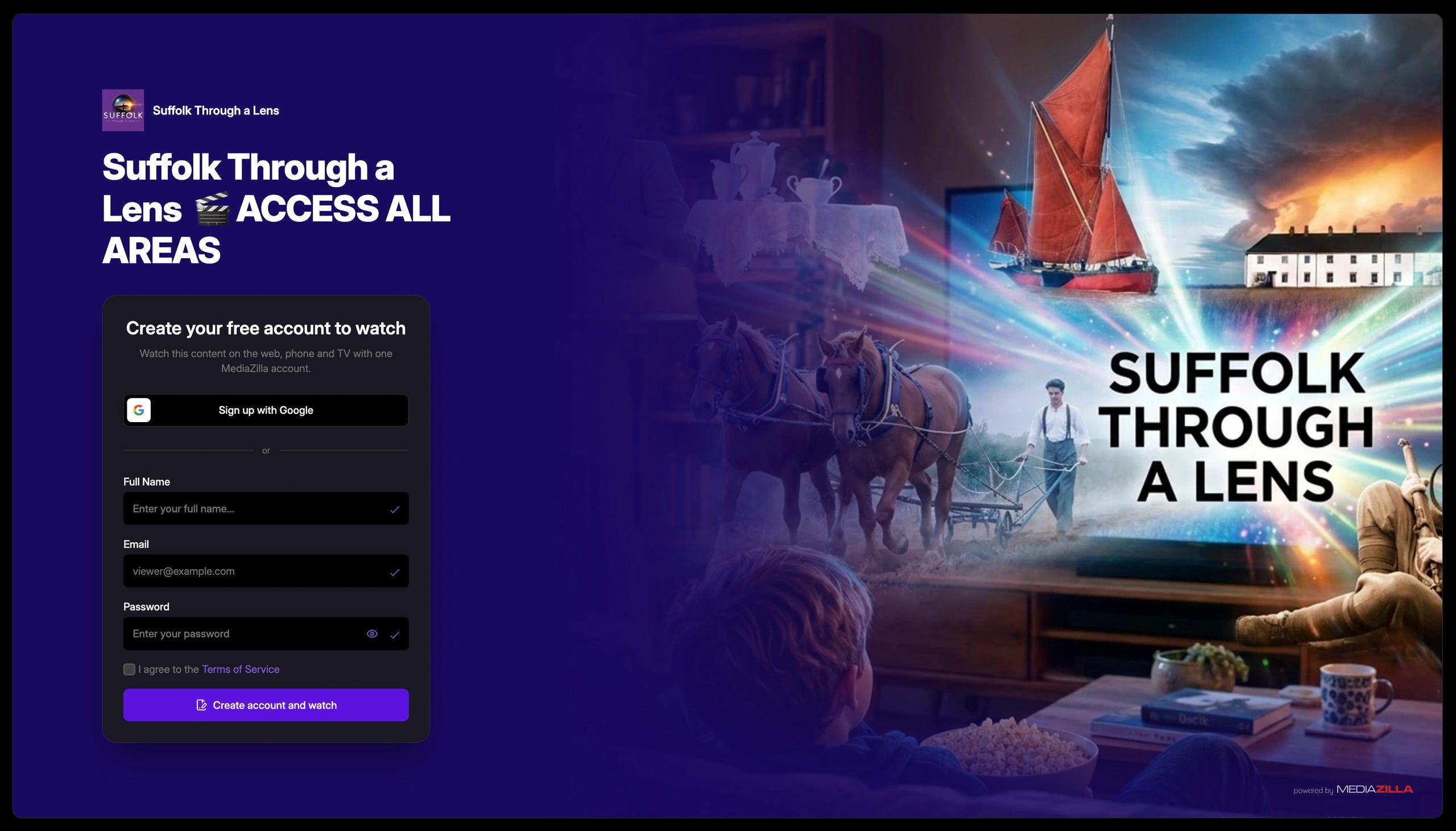
Sign up for your streaming account

This is what the sign up page looks like


After your purchase you will be emailed a link to set up your own personal streaming account with MediaZilla, our content host.


Add your email address and create your password. Keep your log in details. DONE!


We hope you enjoy the content!
SOME OF THE WAYS YOU CAN ENJOY YOUR STREAM EXPERIENCE

Smart TV

Smartphones & Tablets
Watch on TV

The MediaZilla TV app is the best way to watch on your television. It’s available for: Apple TV (4th Generation and newer)

  • Amazon Fire TV
  • Android TV / Google TV (Sony, Phillips, Toshiba, Panasonic, Sharp, Hisense, JVC, TCL, Thomson, Insignia, Haier, Skyworth, 1+TV, MicroMax, Soniq, Sanyo, Kivi, LeEco, Westinghouse, Benq)
  • Nvidia Shield

👉 Learn more: Watching on TV

Watch on TV

Smartphones & Tablets
Watch on TV

Other TVs and devices can be used with casting:

  • Chromecast — Cast from a browser or the MediaZilla mobile app
  • Samsung and LG Smart TVs — Use their browser or cast from a phone/tablet
  • Roku — Use casting or screen mirroring

👉 Learn more: Casting to Your TV


If you are receiving internet to your home but your Wi-Fi is slow - you could connect your computer  to your TV with an HDMI cable 

Smartphones & Tablets

Smartphones & Tablets

MediaZilla projects can also be viewed in the free MediaZilla mobile apps:

  • iPhone & iPad (App Store)
  • Android Phones & Tablets (Google Play or Amazon Appstore)

Once signed in, you can watch projects in the app or cast them to your TV.

👉 Learn more: Watching on iPhone or iPad
👉 Learn more: Watching on Android Phones or Tablets


Computers

Any Win

MediaZilla projects can also be viewed in the free MediaZilla mobile apps:

  • iPhone & iPad (App Store)
  • Android Phones & Tablets (Google Play or Amazon Appstore)

Once signed in, you can watch projects in the app or cast them to your TV.

👉 Learn more: Watching on iPhone or iPad
👉 Learn more: Watching on Android Phones or Tablets


Computers

Any Windows PC or Mac can view MediaZilla projects in a browser, or cast video playback to a TV using Mac screen mirroring Google Cast or AirPlay.

👉 Learn more: Casting to Your TV

SIMPLE SET uP, stream in mInutes

Watch the set up suggestion video

STILL HAVE A QUESTION?

We hope you have a wonderful experience and enjoy our films

We would love to hear your views about the films,  on our service and about the quality of the streaming experience

Suffolk Through a Lens

Email support@suffolkthroughalens.co.uk Telephone 01394 775 035

contact

This site is protected by reCAPTCHA and the Google Privacy Policy and Terms of Service apply.

Cancel

powered by

a selection of streaming options

Social

Copyright © 2026 Suffolk Through a Lens - All Rights Reserved.

  • Privacy

This website uses cookies.

We use essential cookies to help our website function correctly. With your consent, we may also use analytics cookies to understand how visitors use our website and improve their experience. You can accept or reject optional cookies through our cookie settings.

DeclineAccept